

What is the de minimis declaration and how do you sign it?
De minimis is a European Union rule about small-scale government support.
It allows governments to support entrepreneurs — through training, consultations, and educational programmes — without complex approvals at EU level, as long as the total amount of support stays within a set limit.
According to EU Regulation 2023/2831, this limit is €300,000 over any three-year period for one business or a group of connected businesses.
The rule applies in all EU countries, including Denmark, and is not specific to any single project or organisation.
🇪🇺 Why does this apply to our programme?
Participation in The European Ukrainian Hub events is free of charge. But the programme itself is funded by public money from Denmark.
This means participants receive real value — training, access to experts, and tools for building a business — paid for by the state. This kind of support can be used to start or grow a business, which is why it falls under de minimis rules.
For this reason, the organisers are required to document participation and verify that the limit is not exceeded for each participant.
📋 Why everyone signs — with or without a company
The de minimis declaration is mandatory for all participants without exception — regardless of whether you have a CVR number, a registered company, or any business status.
This rule has existed for a long time. In practice, previously only participants who registered on behalf of a company with a CVR number were required to sign the declaration. If someone registered as a private individual, the declaration was generally not required.
In 2026, Erhvervsstyrelsen published a new official interpretation of this rule. According to it, all participants in educational programmes fall under state aid rules — regardless of whether they have a registered company. What matters is not the legal form of registration, but the fact of participating in a publicly funded programme that has economic value.
This is why, starting this year, all participants sign the declaration in the same way — both those registering on behalf of a company and those registering as private individuals.
✅ By signing the declaration, you confirm:
- that you are aware of the de minimis limit (€300,000 over three years);
- what government support you have received in the past three years — if any;
- that you understand: in certain cases, connected businesses or structures may also be taken into account.
If you have not previously received any government support — this is also stated in the form. This answer is standard and completely expected.
🚫 Signing the declaration does NOT mean:
- it does not mean you have or need to have a registered company;
- it does not mean you are already running a business;
- it does not mean you have received money or financial aid;
- it does not create any financial or tax obligations;
- it does not change your legal status.
This is a required administrative procedure within a publicly funded programme. You are providing information needed for your participation to be properly processed — nothing more.
⚠️ Why registration is not possible without the declaration
The project organiser is responsible to the funding authorities for complying with state aid rules.
The declaration is a mandatory part of this process. Registration cannot be completed without signing it. This applies to all participants without exception.
🖊️ How to sign the declaration: step by step
Signing the declaration is not a separate procedure — it is built into the event registration process. When you register for a workshop on the platform, the system will automatically guide you through this step.
Signing takes place through Penneo — a standard certified electronic signature platform in Denmark.
Identity verification is done via MitID — the official digital identification system used everywhere in Denmark: in banks, on the SKAT portal, and for access to government services.
MitID is used twice during the process, but the declaration is signed only once. The first time — to open the document and confirm your identity. The second time — to confirm the signature itself. This is a standard security procedure, nothing unusual.
Step-by-step screenshots
Below is the step-by-step process of signing the de minimis declaration — each screen in the order it appears during registration.
To get to this step, first:
- Go to https://teuh3.ehsys.dk/workshops
- Choose an event and click «Start registration»
- Indicate whether you have a profile:
- «I have a profile» — if you have registered for project events before
- «I don't have a profile» — if this is your first time; the system will prompt you to create one
- Choose your participation format:
- as a private individual — if you are registering in your own name
- on behalf of a company — if you are registering with a CVR number
The de minimis declaration is signed in both cases. If you are registering on behalf of a company, signing is done via the company's MitID.
The system will then automatically open the de minimis declaration signing process — exactly as shown below.
Step 1 — Open the document

After filling in your details, the system will take you to the Penneo platform. You will see a screen with the heading «Access the documents».
Here you are asked to confirm your identity via MitID — this is only needed to open and review the document. The declaration is not being signed yet.
Click the «MitID» button and complete the verification.
«Reject to sign» — this is a technical decline button. You do not need to click it.
Step 2 — Review the declaration and proceed to signing
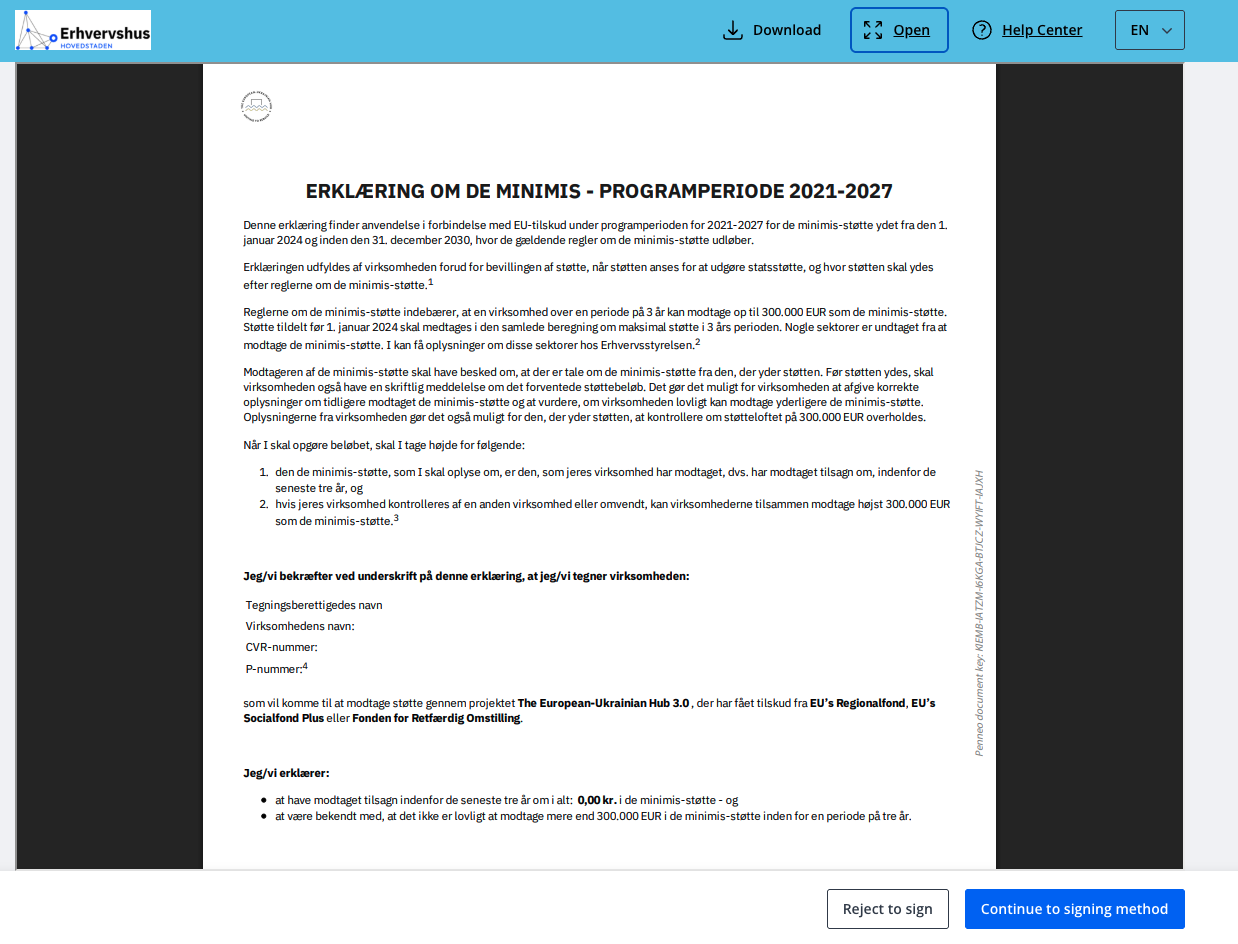
After confirming via MitID, the declaration document opens. It is written in Danish — this is the standard official form used for all programme participants in Denmark.
If you would like to save a copy of the document before signing — click «Download» in the top right corner.
When you are ready — click the blue «Continue to signing method» button at the bottom right.
«Reject to sign» — this is a technical decline button. You do not need to click it.
Step 3 — Review and sign
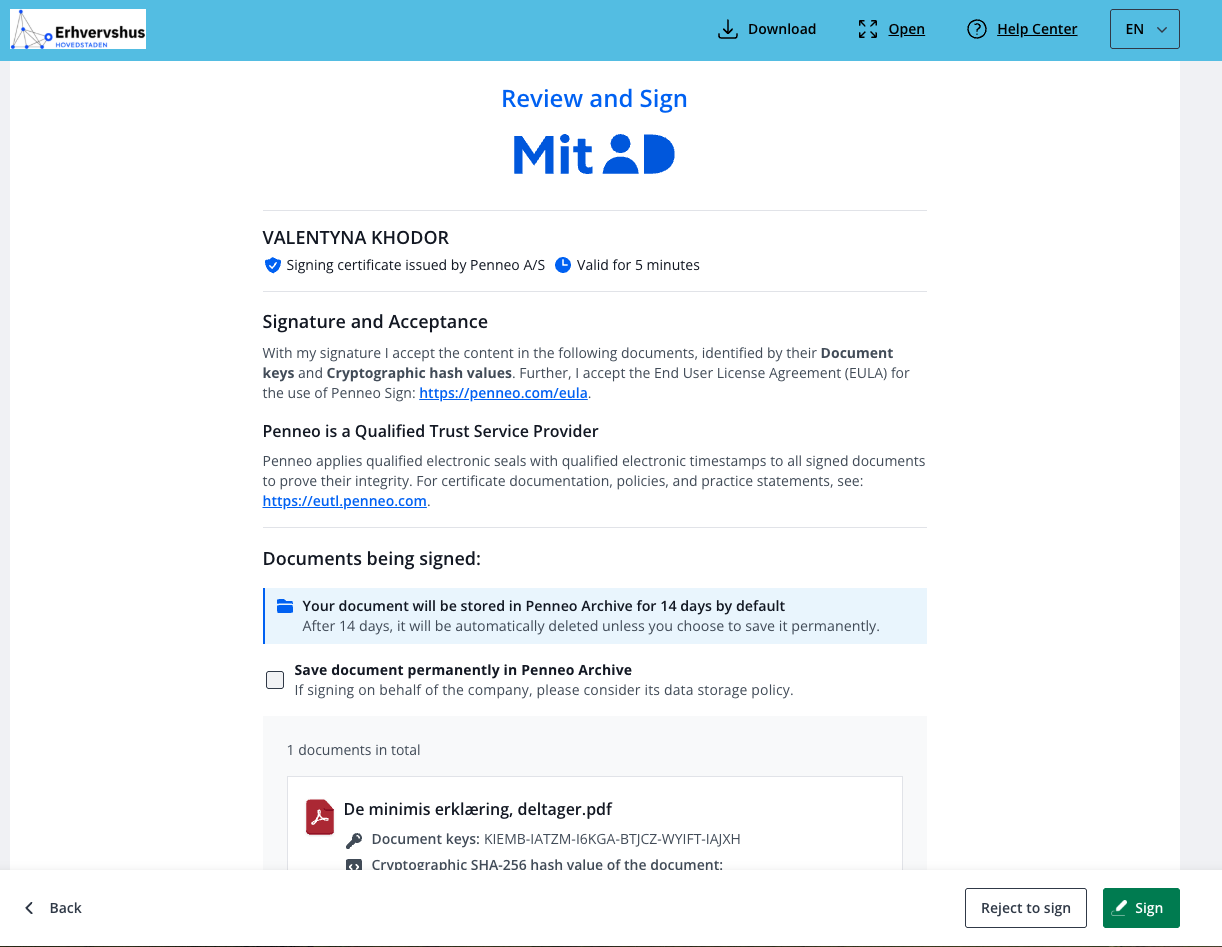
After confirming via MitID, the signature confirmation screen opens. Your name and the document are shown — «De minimis erklæring, deltager.pdf».
The signed document will be stored in Penneo Archive for 14 days. If you would like to keep it permanently — tick «Save document permanently» before clicking «Sign».
When you are ready — click the green «Sign» button. The system will redirect you to MitID for final confirmation — this is the last step, after which the declaration will be signed.
«Reject to sign» — this is a technical decline button. You do not need to click it.
Step 4 — Done 🎉

You will see a confirmation screen with «Signing completed» — the declaration is signed and registration is complete.
A confirmation email will be sent to the address you used during registration. The email will contain a link to your signed document — this is your receipt, which you can save for your records.
🎬 Video guide — full registration process
Choose the video that matches your situation:
📹 If you have registered before (have a profile) → Link to video
The video covers: logging in with an existing profile, resetting your password if you've forgotten it, and signing the de minimis declaration.
📹 If you are registering for the first time (no profile) → [Link to video coming soon]
Each video shows the full registration process — including signing the de minimis declaration.
📎 Official sources and documents
If you would like to review the official materials — here are the links and files.
EU Regulation Official text of Regulation (EU) 2023/2831 on EUR-Lex → https://eur-lex.europa.eu/legal-content/EN/ALL/?uri=oj:L_202302831
Official Danish explanation What is de minimis — Virksomhedsguiden → https://virksomhedsguiden.dk/content/temaer/oekosystem-for-erhvervsfremme/ydelser/hvad-er-de-minimis-stoette/2e3baa4f-a96b-43d4-8faf-ff991f724bb8/
Forms and declarations Official Erhvervsstyrelsen page → https://udviklingidanmark.erhvervsstyrelsen.dk/blanketter-og-erklaeringer-vedroerende-statsstoette-de-minimis-og-den-generelle
📄 Official guidance on state aid rules — PDF
📄 De minimis declaration template — PDF